What’s New in 33.5.0.0
This section describes the new features and components introduced in this version on top of Alteon version 33.0.3.0.
vRA/vRO Workflows
The vRA/vRO plug-in, available for direct Alteon configuration, now offers more than two dozen out-of-the-box workflows for device onboarding, networking, and virtual servers and service configuration. The plug-in will be available for download on github.
The plug-in was tested for vRA/vRO version 8.5.
HTTP/3 Gateway
The following enhancements were added to the HTTP/3 gateway feature:
Layer 7 Services
The HTTP/3 gateway supports the following Layer 7 services:
 Integrated WAFBoT ManagerDNS over HTTPS proxyAppShape++ for content-aware server selection and content modifications.
Note: Content rules and Content Modification rules were not tested for HTTP/3 gateways.
HTTP/3 Service Advertise Parameter
HTTP/3 does not have a designated port like 443 for HTTPS. A browser first connects to the server with HTTP/2 to discover the service. A server that supports HTTP/3 responds with an Alt-Svc header, including the port for HTTP/3, such as Alt-Svc: h3=":50781". If the browser supports HTTP/3, it opens a QUIC connection to the specified port.
In the previous version, this was achieved using AppShape++ or a Content Modification rule.
In this version, a dedicated flag was added for the HTTPS virtual service to advertise the HTTP/3 service (relevant only to HTTP/2 and HTTP/1 services).
In WBM/APSolute Vision: On the Virtual Service pane > HTTP tab, enable Advertise HTTP/3 Service and configure the HTTP/3 service portIn CLI: Configure the HTTP/3 service port with the following command: cfg/slb/virt X/service 443/http/http3port.Hardware Acceleration
SSL processing for HTTP/3 (QUIC) can now be offloaded to the hardware acceleration component (QAT), when such a component is present (models S and SL).
Chinese Crypto Algorithms (SM2, SM3 and SM4) Support
The National Password Authority for the People’s Republic of China password industry standard approach has announced the SM2/SM3/SM4 and other cryptographic algorithm standards and application specifications. SM is the abbreviation for the national commercial cryptographic algorithm of the People's Republic of China.
SM2 is a public key cryptography algorithm based on elliptic curve cryptography, including digital signature, key exchange, and public key encryption. It is used to replace international algorithms such as RSA/Diffie-Hellman/ECDSA/ECDH. SM3 is a password hash algorithm, operating on 512-bit blocks to produce a 256-bit hash value.SM4 is a block cipher used to replace DES/AES and other international algorithms. The following SSL features are supported on Alteon with SM support:
Client-side SSL offload: Client Authentication can also be supported but only with the ECDHE-SM2-WITH-SM4-SM3 cipher Server-side SSL encryptionImport of SM2 private key and certificateSelf-signed SM2 certificate generationNote: For Alteon support of the SM cipher suite:
A special image, available only to the Chinese market, must be installed on the Alteon device.A special license for SM ciphers must be installed. Without this license, SSL offload is not enabled on the special image.The processing of SM ciphers is performed in software only.NFR ID: 201202-000006
64GB RAM on 5424/5820
The 5424/5820 platforms can now support up to 64 GB RAM, allowing for processing a higher number of concurrent connections. HPP models will now be available for these models.
BGP IPv6 ECMP Traffic Load Balancing
ECMP (Equal Cost Multipath Protocol) for BGP enables Alteon to distribute egress traffic between multiple next hop routers that have an equal cost path to the destination.
ECMP for BGP now also supports IPv6 traffic (IPv4 support was introduced in version 33.0.3.0).
Note: ECMP for BGP is available only when using the new FRR BGP library (FRR mode)
NFR ID: 210304-000102
ADFS Health Check
Active Directory Federation Services (ADFS), is a software component developed by Microsoft, that can run on Windows Server operating systems to provide users with single sign-on access to systems and applications located across organizational boundaries. It uses a claims-based access-control authorization model to maintain application security and to implement federated identity. It is part of the Active Directory Services.
Alteon can now monitor the health of an ADFS service using an external shell script.
Note: Currently only the cURL tool is supported in these scripts.
Configuring Alteon to use the external health check (HC) feature for ADFS health monitoring involves the following main steps:
4. Before being able to use external health check scripts, you must enable this functionality (/maint/debug/extscrhcd ena) and reboot the device.
1. Importing an external health check script to the External HC Scripts repository (/cfg/slb/advhc/extscrpt/script; Configuration > Application Delivery > Server Resources > External HC Scripts)
2. Creating a health check of type ADFS. This involves associating a script from the External HC Scripts Health Check repository.
NFR ID: 201129-000071
Ansible Modules
New Ansible modules were added for:
Configuration of GEL DNS parametersControl of port processing capabilities (client/server/proxy processing)NFR ID: 210215-000073, 210215-000074
GEL Entitlement Migration Workflow
The GEL Migration workflow allows migration of GEL Alteon instances from one entitlement to another entitlement, which is placed on the same LLS or on a different LLS.
Multiple GEL instances can be selected for this migration, and a migration summary report will be displayed at the end of the process.
Multiple GEL instances can be selected for this migration, and a migration summary report will be displayed at the end of the process.
The workflow can be downloaded from GitHub at: https://github.com/Radware/Migrating-Alteon-GEL-Entitlements
Upload the workflow to APSolute Vision (Automation > Workflow) or to vDirect (Inventory > Workflow template).
Source NAT for Health Checks
Health checks of servers use as the source IP address the Alteon IP interface to which the servers are connected. Now it is possible to specify a different IP address (NAT) as source the IP address. To achieve this, the following is required:
Configure the health check NAT address for the IP interface connected to the serversTurn on the Source NAT flag in the respective health check.This capability is supported only for IPv4 servers.
Important! When using source NAT for health checks, the IP interfaces must not be synced with the peer device as part of Configuration Sync mechanism (the IP interface sync is disabled by default). In a high availability environment, backup devices also perform health checks (to be ready to take over quickly), so each device must use a different NAT address for the health checks.
NFR ID: 210428-000062
PMTU Discovery Support
When operating in Proxy mode (Delayed Bind Force Proxy), Alteon separately manages connections to the clients and connections to the servers, and as a result can support PMTU discovery:
On the client side, if Alteon receives from the client a packet longer than the MTU, Alteon sends an ICMP error back to the client. On the server side, if Alteon receives an ICMP error, it adjusts the MTU accordingly to be correct, and resends the data with the new MTU.When operating in Layer 4 mode (Delayed Bind Disabled), Alteon does not perform connection termination, so the PMTU is negotiated between the origin client and server. If the server responds with an ICMP error, Alteon forwards it to client like any other response from the server.
NFR ID: 210814-000040
FIPS Card Support for 7220
The Nitrox III FIPS SSL card is now supported for the Alteon 7220 platform.
To order Alteon 7220 FIPS, order the D-7220S platform required and the separate FIPS II card part number (factory installed).
Integrated AppWall
WebSocket
In the previous version support of the WebSocket protocol was introduced. In this version, the following WebSocket support was added:
Connection per source - where the maximum number of connections that a source can open to a specific WebSocket application is defined. Low & Slow attack mitigation where we configure the following:Time Gap Between Checks - The time span during which the AppWall is counting the traffic rate on the inspected connection. Minimal traffic volume threshold to trigger protection. Two minor changes were also introduced:
The enforcement of the WebSocket server response payload type can be optional. When the WebSocket is in “block” mode in the Tunnel configuration, the client connection is closed with a Security Page and not with a TCP reset. 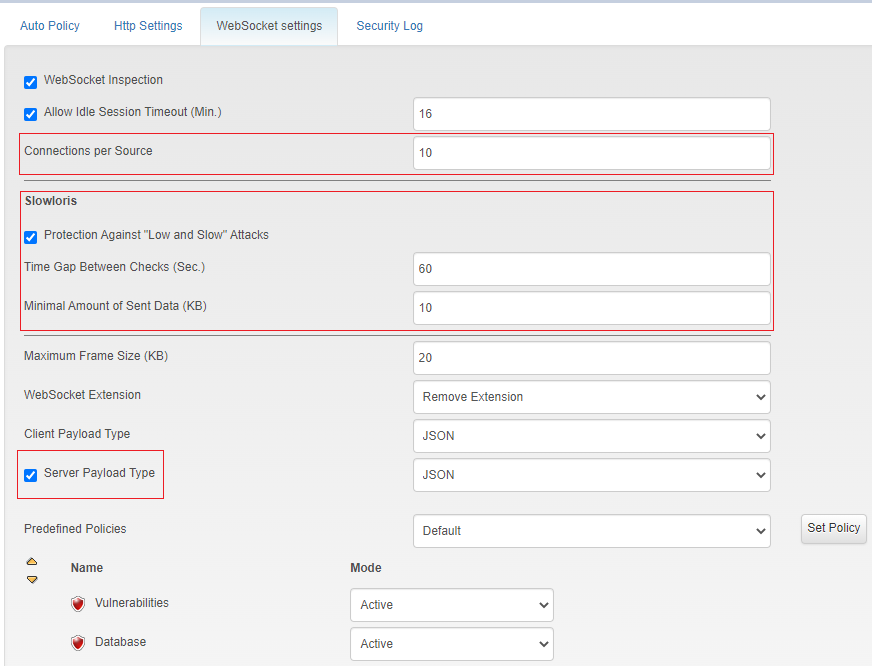
API Security
In the API Security module, a new "Block" action for the endpoint’s schema enforcement is added.
Previously, “Active”, “Passive” and “Bypass” actions were supported. The new "Block" action will immediately block the client request. It manages use cases such as:
When an endpoint is deprecated (for example, because of a bug) and the customer does not want any request to reach the API service, the deprecated endpoint can be in Block mode where the new endpoint can be in Active modeWhen an endpoint presents some security risks (for example, data leakage, 0-days attacks, injections) and the customer wants to immediately block any incoming request to this endpoint until it is fixed.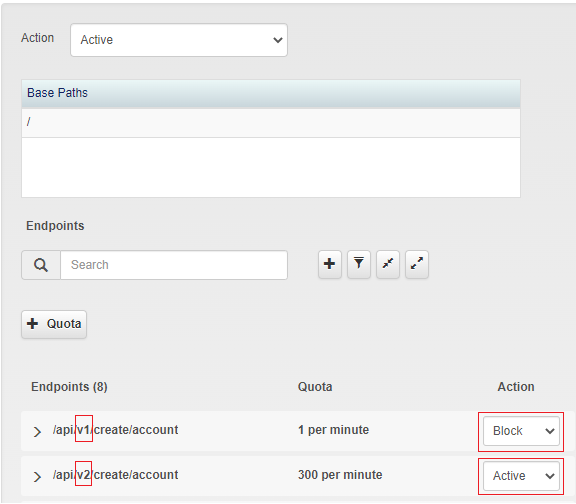
Advanced Base64 Attack in HTTP Headers
Following previous deliveries related to Base64 Heuristic Detection and Multiple Encoded attacks, in this version, we added support for multiple-encoded attacks in the HTTP header, such as harmful Injections, with the AppWall Database filter.
Filter Tunnel Command
Filters are grouped into tunnels. Filter matching is done first on a Layer 1-Layer 4 basis. Once there is a match for a filter, the additional matching is only done inside the tunnel.
The filter tunnel creation logic is as follows:
1. Each non-HTTP filter has its own tunnel.
2. Filterset creates a separate filter tunnel.
3. A tunnel is created per physical port plus IP version, and includes all HTTP filters that do not have an SSL policy
4. HTTPS filters are grouped according to the following parameters: Physical port, IP version, SSl policy, Certificate, and SSL Inspection
5. Filters with Application ‘none’ are added to an HTTP tunnel, if it exists. If there is no HTTP tunnel, the filter will not have a tunnel.
A new CLI command was added (/info/slb/ftunnel) to better expose the grouping of the filters into tunnels.