What’s New
This section describes what is new in version 10.9.0.0.
Security Coverage and SecOps
Support Subnet Allowlist in GEO/EAAF/UDF/ASN Protections
In this release, managing feed-based protection Allowlists is now simpler with the ability to define entire subnets instead of adding individual IPs. This enhancement applies to EAAF, GEO, UDF, and ASN protections. The Allowlist in these protections enables specified subnets or IPs to bypass blocking, even if they appear in the feed.
The Allowlist enhancement is available in the Device Driver. For configuration details, refer to the Cyber Controller 10.9.0 user guide and/or release notes.
New Autonomous System Number (ASN) Protection Feed
Starting in DefensePro 10.9.0.0 and Cyber Controller 10.9.0, Radware introduces a new protection based on ASN sources and an ASN Global feed, which is updated automatically in DefensePro.
Note: ASN feed is currently not supported for DefensePro X10 and X20. This limitation will be resolved in the upcoming releases of DefensePro.
Key Capabilities:
 Ability to block traffic based on the list of up to 100 ASNs per policy.Support for IPv4 and IPv6 ASN addresses. Automatic, scheduled ASN updates based on global ASN Feed from the Radware portal.Ability to block or allow traffic based on the ASN.Ability to include specific IPs and/or whole subnets in the Allowlist, including whole subnets, which is a new feature introduced in DefensePro 10.9.0.0.
Configuring ASN Protection is available in both the Device Driver and Policy Editor. For configuration details, refer to the Cyber Controller 10.9.0 user guide and/or release notes.
Top-ASN Statistics Under Attack
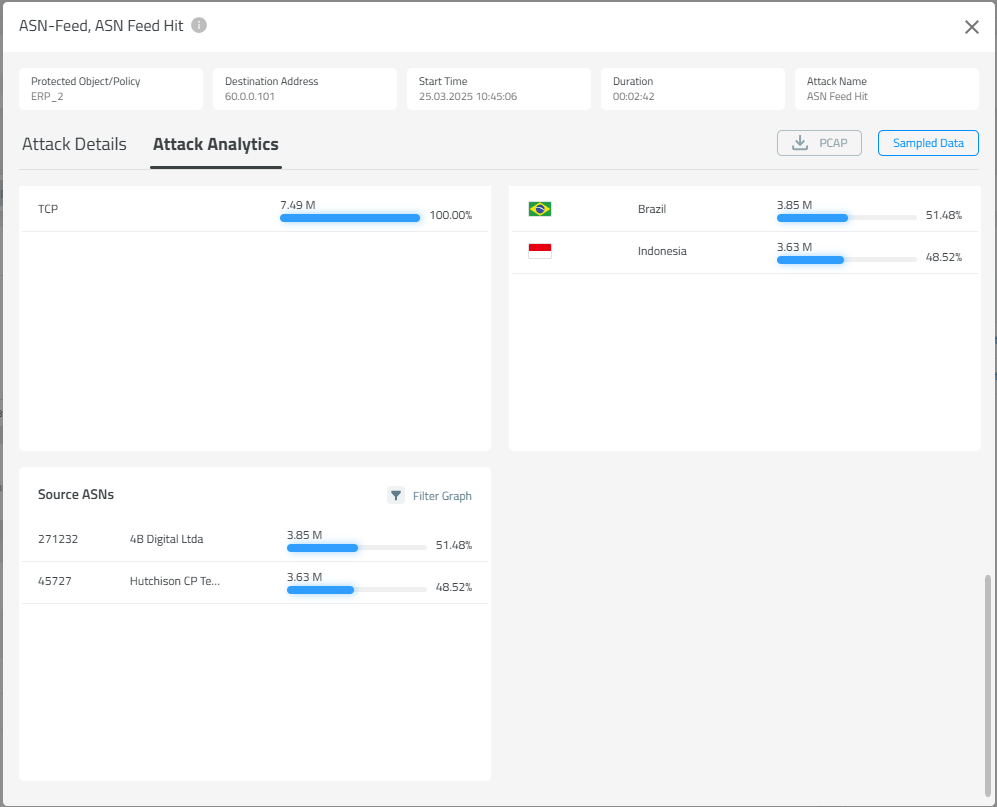
When DefensePro identifies traffic from ASNs that should be blocked or reported, the top ASNs can be viewed in Attack Analytics, as shown below.
TLS Fingerprint Reputation Feed – General Availability
TLS Fingerprint Reputation Feed, part of Web DDoS Protection, is now generally available (GA).
Integrated with the Radware Global Feed, a continuously updated feed of high-risk fingerprints sourced from global threat intelligence, this feature is integrated into Radware’s on-prem DDoS protection solution. It leverages advanced analytics and real-time threat intelligence to automate the detection and blocking of malicious TLS fingerprints, strengthening security posture against evolving threats.
Radware Global Feed Integration – Gain automatic access to a curated list of high-risk TLS fingerprints, which is updated multiple times a day based on Radware’s global threat intelligence.Automated Mitigation – High-risk fingerprints are dynamically blocked, minimizing the attack surface with little need for manual intervention.Enhanced Learning and Customization – Configure reputation thresholds and enforcement policies based on your specific risk tolerance.Seamless Visibility and Control – Monitor blocked fingerprints, fine-tune policies, and review insights through the intuitive dashboard.Flexible Enforcement Mode – Enforcement is disabled by default but can be activated via the Settings panel. When enabling enforcement and selecting the policies to which the feeds will be applied, you also have the option to:Exclude Citizens from being blocked, ensuring legitimate user traffic remains unaffected.Exclude and not use the Radware Cloud Feed, giving you control over the choice of using Radware Cloud Feed.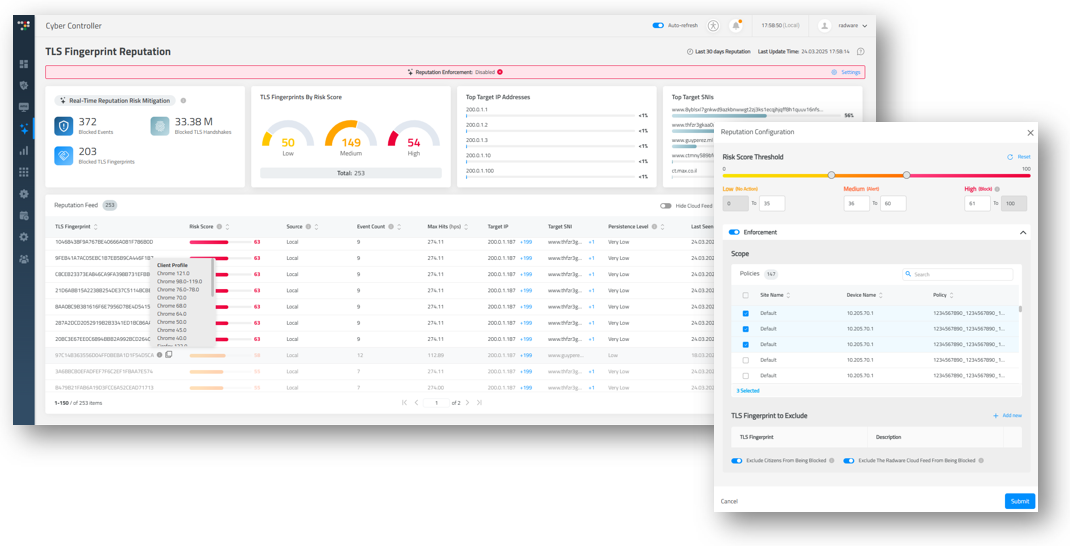
GEO Protection – Global Rate Threshold
With this version release, a Geolocation rate threshold was added per policy. This enhancement provides customers with greater flexibility to allow specific countries and set their threshold rates. In addition, a group threshold has been introduced to limit other non-allowed geolocations.
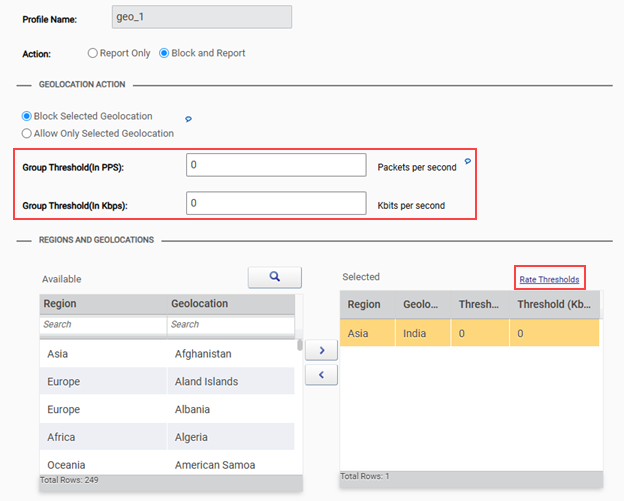
When action is set to Allow Only Selected Geolocation, the Group Threshold applies to the countries listed in the left‑side table (as shown above), which are countries not included in the allow list.
When action is set to Block Selected Geolocation, the Group Threshold applies to 0‑threshold countries listed in the right‑side table (as shown above).
Protection Order Change – Traffic Filter After Out-Of-State
The primary objective of traffic filter protection is to serve as a last resort when more advanced protection mechanisms (behavioral and non-behavioral) might fail. Traffic Filters rely on threshold-based rules and are intended to be used later in the protection order to allow more sophisticated protections to act first.
Therefore, starting in this version, Traffic Filter Protection will be moved down the protection order and placed after Out-Of-State Protection to prevent possible session-related false positives.
Note: For platforms with HW-Accelerator, this change applies to Traffic Filters - Advanced. Traffic Filters - Basic remains active at the HW-Accelerator and has higher priority.
For SW-based platforms, this change might increase platform utilization.
Product Offerings
DefensePro X New Platforms – X110 / X220 / X380
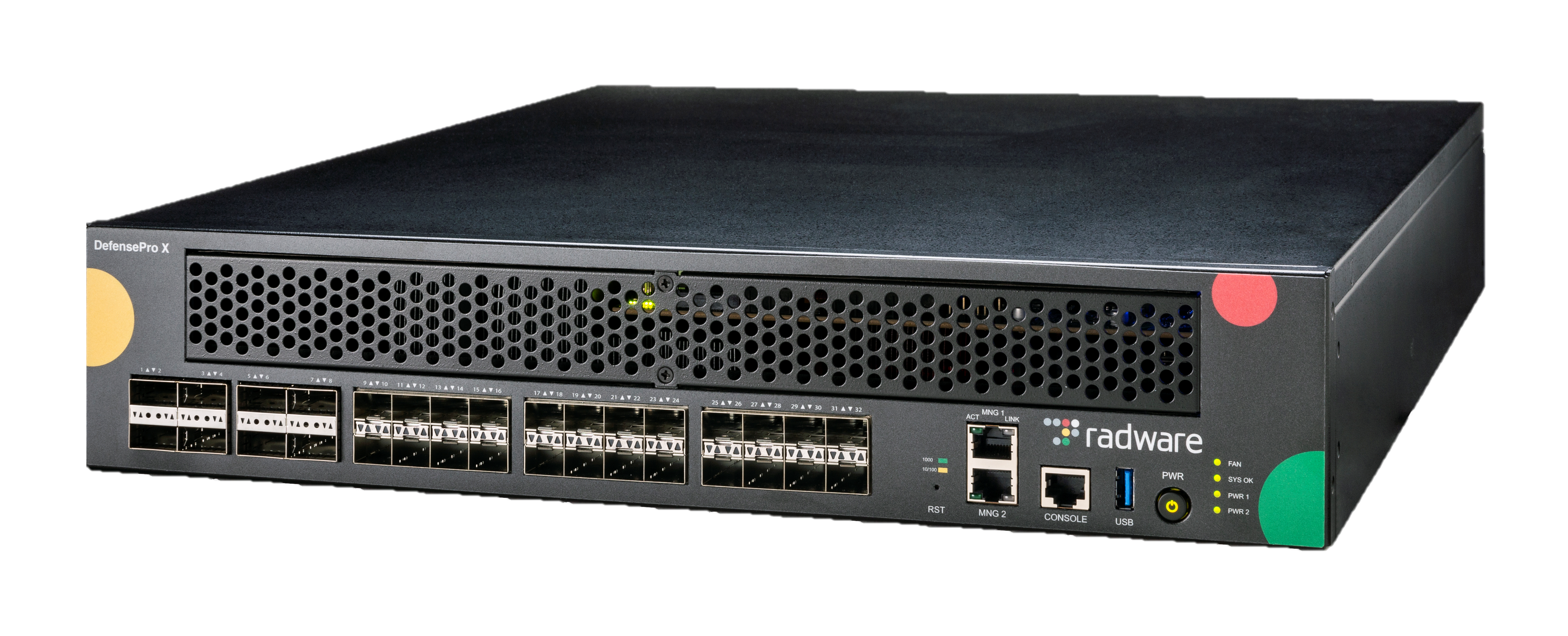
Radware is pleased to announce three new platforms available from version release 10.9.0.0.
DefensePro X110, DefensePro X220, and DefensePro X380 deliver cutting-edge power with modern CPUs and HW acceleration, setting a new benchmark in the high-end on-premises DDoS market. These top-notch platforms showcase unparalleled performance capabilities in their segment.

Standard DNS Protection
Starting in this version, Standard DNS Protection is included in the box, providing standard DNS protection capabilities such as RFC compliance check, QPS rate limiting, and limited allowlist entries.
The Advanced Behavioral DNS Protection, as introduced in version 10.5.0.0, remains part of the Application Protection Subscription.
DNS Protection Tier Comparison
Standard DNS Protection (Included in the Box) | Advanced Application Protection Subscription | |
|---|---|---|
DNS RFC Compliance |  |  |
QPS Rate Limit |  |  |
Auto Scoping |  |  |
Allowlist |  |  |
DNS Challenge Response |  |  |
Adaptive Rate Limit |  |  |
Standard HTTPS Protection Subscription
Starting in this version, the Encrypted Web-DDoS solution offers two subscription tiers of protection designed to surpass competition by addressing both standard and advanced security needs. The first tier delivers standard, competitive protection, including TLS compliance checks and full decryption. The second tier enhances security with advanced threat intelligence, challenge‑response mechanisms, and adaptive Encrypted Web-DDoS response capabilities, tailored to counter evolving cyber risks and attack vectors.
HTTPS Standard Protection
The Standard Application Protection tier includes a standard HTTPs protection subscription, aligning with RFP requirements and competitive offerings. It offers basic security coverage based on rate limiting and full decryption, which requires a customer-provided certificate.
HTTPS Advanced Protection
The Advanced Application Protection tier features advanced behavioral TLS detection and mitigation techniques, offering seamless protection without the need for certificates.
HTTPS Protection Tier Comparison
Standard Application Protection Subscription | Advanced Application Protection Subscription | |
|---|---|---|
TLS RFC Compliance |  |  |
Rate Limit (By TF) |  |  |
Full Traffic Decryption |  |  |
TLS 1.3 Support on HW |  |  |
L7 Authentication |  |  |
CDN L7 Authentication |  |  |
Web-DDoS – Encrypted Behavioral TLS |  |  |
TLS Fingerprint Reputation Feed |  |  |
Additional Enhancements
Support Bi-Directional (Bi-Di) Transceivers for 100G
DefensePro X 100G supported platforms are now certified and compatible with 100G Bi-Di transceivers.
SYN Flood Protection – TCP Reset Optimization
In version 10.8.0.0 SYN Flood Protection introduced support in dual mode (per host and/or carpet bombing) for all protocols. From release 10.9.0.0, when carpet bombing attack occurs, TCP Reset challenge is applied for supported protocols only (HTTP/S and SMTP), and Safe Reset for all other protocols. This change ensures no false positives.
Removal of Telnet Protocol
Telnet is an outdated and non-secured protocol. As of this version, Telnet protocol has been removed and is no longer supported.